Lazylinop core module
This module defines the general lazy linear operator and basic specializations. It provides also utility functions.
LazyLinOp: the core class for lazy linear operators.
Available operations
+ (addition), - (subtraction),
@ (matrix product), * (scalar multiplication),
** (matrix power for square operators),
indexing, slicing and others.
For a nicer introduction you might look at these tutorials.
LazyLinOp class
- class lazylinop.LazyLinOp(shape, matvec=None, matmat=None, rmatvec=None, rmatmat=None, dtype=None)
The
LazyLinOpclass is a specialization of a scipy.linalg.LinearOperator.The lazy principle
The evaluation of any defined operation on a
LazyLinOpis delayed until a multiplication by a matrix/vector or a call ofLazyLinOp.toarray()is made.Two ways to instantiate
Using
lazylinop.aslazylinop()orUsing this constructor (
lazylinop.LazyLinOp()) to definematmat,matvecfunctions.
Available operations
+(addition),-(subtraction),@(matrix product),*(scalar multiplication),**(matrix power for square operators), indexing, slicing and others. For a nicer introduction you might look at these tutorials.Recursion limit
Repeated “inplace” modifications of a
LazyLinOpthrough any operation like a concatenation (op = vstack((op, anything))) are subject to aRecursionErrorif the number of recursive calls exceedssys.getrecursionlimit(). You might change this limit if needed usingsys.setrecursionlimit().A
LazyLinOpinstance is defined by a shape and at least a functionmatvecormatmat. Additionally the functionsrmatvecandrmatmatcan be defined through the following parameters.Parameters
- shape: (
tuple[int, int]) Operator \(L\) dimensions \((M, N)\).
- matvec: (callable)
Returns \(y = L * v\) with \(v\) a vector of size \(N\). \(y\) size is \(M\) with the same number of dimension(s) as \(v\).
- rmatvec: (callable)
Returns \(y = L^H * v\) with \(v\) a vector of size \(M\). \(y\) size is \(N\) with the same number of dimension(s) as \(v\).
- matmat: (callable)
Returns \(L * V\). The output matrix shape is \((M, K)\).
- rmatmat: (
callable) Returns \(L^H * V\). The output matrix shape is \((N, K)\).
- dtype: (numpy
dtypeorNoneType) Data type of the
LazyLinOp(default isNone).
Auto-implemented operations
If only
matvecis defined and notmatmat, an automatic naivematmatwill be defined upon the givenmatvecbut note that it might be suboptimal (in which case amatmatis useful).No need to provide the implementation of the multiplication by a
LazyLinOp, or a numpy array withndim > 2because both of them are auto-implemented. For the latter operation, it is computed as in numpy.__matmul__.
- Return:
LazyLinOp- Example:
>>> # In this example we create a LazyLinOp
>>> # for the DFT using the fft from scipy
>>> import numpy as np
>>> from scipy.fft import fft, ifft
>>> from lazylinop import LazyLinOp
>>> fft_mm = lambda x: fft(x, norm='ortho')
>>> fft_rmm = lambda x: ifft(x, norm='ortho')
>>> n = 16
>>> F = LazyLinOp((n, n), matmat=fft_mm, rmatmat=fft_rmm)
>>> x = np.random.rand(n)
>>> y = F * x
>>> np.allclose(y, fft(x, norm='ortho'))
True
>>> np.allclose(x, F.H * y)
True
See also
Attributes
Methods
LazyLinOp main methods: LazyLinOp.toarray(),
LazyLinOp.conj(),
LazyLinOp.check(),
LazyLinOp.__pow__().
- lazylinop.LazyLinOp.toarray(self)
Returns self as a numpy array.
- lazylinop.LazyLinOp.conj(self)
Returns the
LazyLinOpconjugate.
- lazylinop.LazyLinOp.check(self)
Verifies validity assertions on any
LazyLinOp.Notations:
Let
opaLazyLinOp,u,vvectors such thatu.shape[0] == op.shape[1]andv.shape[0] == op.shape[0],X,Y2d-arrays such thatX.shape[0] == op.shape[1]andY.shape[0] == op.shape[0].
The function verifies that:
(op @ u).shape == (op.shape[0],),(op.H @ v).shape == (op.shape[1],),op.H @ Yis equal to the horizontal concatenation of allop.H @ Y[:, j]for j in {0, …,Y.shape[1]-1}.op @ Xis equal to the horizontal concatenation of allop @ X[:, j]for j in {0, …,X.shape[1]-1}.
Computational cost
This function has a computational cost of several matrix products. It shouldn’t be used into an efficient implementation but only to test a
LazyLinOpimplementation is valid.Necessary condition but not sufficient
This function is able to detect an inconsistent
LazyLinOpaccording to the four assertions above but it cannot ensure a particular operator computes what someone is excepted this operator to compute. In other words, the operator can be consistent but not correct at the same time. Thus, this function is not enough by itself to write an operator unit tests, complementary tests are necessary.- Args:
- op: (
LazyLinOp) Operator to test.
- op: (
- Example:
>>> from numpy.random import rand
>>> from lazylinop import aslazylinop, LazyLinOp
>>> M = rand(12, 14)
>>> # numpy array M is OK as a LazyLinOp
>>> aslazylinop(M).check()
>>> # the next LazyLinOp is not
>>> L2 = LazyLinOp((5, 2), matmat=lambda x: np.ones((6, 7)))
>>> L2.check()
Traceback (most recent call last):
...
Exception: Wrong operator dimension
See also
aslazylinop(),LazyLinOp
- lazylinop.LazyLinOp.__pow__(self, n)
Returns the
LazyLinOpfor the n-th power ofself.L**n == L @ L @ ... @ L(n-1 multiplications).
- Raises:
The
LazyLinOpis not square.- Example:
>>> from lazylinop import aslazylinop
>>> import numpy as np
>>> M = np.random.rand(10, 10)
>>> lM = aslazylinop(M)
>>> np.allclose((lM**2).toarray(), M @ M)
True
Module utility functions
- lazylinop.islazylinop(obj)
Returns
Trueifobjis aLazyLinOp,Falseotherwise.
- lazylinop.aslazylinop(op, shape=None)
Returns
opas aLazyLinOp.- Args:
- op: (
object) May be of any type compatible with scipy.sparse.linalg. aslinearoperator (e.g. a
numpy.ndarray, a scipy matrix, a scipy.LinearOperator, a pyfaust.Faust object, …).See the
LazyLinOpdocumentation for additional information.- shape: (
tuple[int, int]) The shape of the resulting
LazyLinOp. IfNonethe function relies onop.shape. This argument allows to overrideop.shapeif for any reason it is not well defined (see below, the example ofpylops.Symmetrizedefective shape).
- op: (
- Returns:
A
LazyLinOpinstance based onop.
Examples:
- Creating a
LazyLinOpbased on a numpy array: >>> from lazylinop import aslazylinop >>> import numpy as np >>> M = np.random.rand(10, 12) >>> lM = aslazylinop(M) >>> twolM = lM + lM >>> twolM <10x12 LazyLinOp with unspecified dtype>
- Creating a
LazyLinOpbased on a pyfaust.Faust: >>> import pyfaust as pf >>> F = pf.rand(10, 12) >>> lF = aslazylinop(F) >>> twolF = lF + lF >>> twolF <10x12 LazyLinOp with unspecified dtype>
- Using the
shapeargument on a “defective” case: >>> # To illustrate the use of the optional “shape” parameter, >>> # let us consider implementing a lazylinearoperator >>> # associated with the pylops.Symmetrize linear operator, >>> # (version 2.1.0 is used here) >>> # which is designed to symmetrize a vector, or a matrix, >>> # along some coordinate axis >>> from pylops import Symmetrize >>> M = np.random.rand(22, 2) >>> # Here we want to symmetrize M >>> # vertically (axis == 0), so we build the corresponding >>> # symmetrizing operator Sop >>> Sop = Symmetrize(M.shape, axis=0) >>> # Applying the operator to M works, and the symmetrized matrix >>> # has 43 = 2*22-1 rows, and 2 columns (as many as M) >>> # as expected! >>> (Sop @ M).shape (43, 2) >>> # Since it maps matrices with 22 rows to matrices with 43 rows, >>> # as we intend the “shape” of Sop should be (43,22) >>> # however, the “shape” as provided by pylops is inconsistent >>> Sop.shape (86, 44) >>> # To use Sop as a LazyLinOp we cannot rely on the “shape” >>> # given by pylops (otherwise the LazyLinOp-matrix product >>> # wouldn't be properly defined) >>> # Thanks to the optional “shape” parameter of >>> # aslazylinop, >>> #this can be fixed >>> lSop = aslazylinop(Sop, shape=(43, 22)) >>> # now lSop.shape is consistent >>> lSop.shape (43, 22) >>> (lSop @ M).shape (43, 2) >>> # Besides, Sop @ M is equal to lSop @ M, so all is fine! >>> np.allclose(lSop @ M, Sop @ M) True
Basic operators
Construction
Functions for creating a Lazylinop from scratch
(providing the related parameters).
- lazylinop.diag(v, k=0, extract_meth='canonical_vectors', extract_batch=1)
Extracts a diagonal or constructs a diagonal
LazyLinOp.- Args:
- v: (compatible linear operator, 1D
numpy.ndarray) - k: (
int) The index of diagonal,
0for the main diagonal,k > 0for diagonals above,k < 0for diagonals below (seeeye()).- extract_meth: (
str) The method used to extract the diagonal vector. The interest to have several methods resides in their difference of memory and execution time costs but also on the operator capabilities (e.g. not all of them support a CSC matrix as multiplication operand).
'canonical_vectors': use canonical basis vectors \(e_i\) to extract each diagonal element of the operator. It takes an operator-vector multiplication to extract each diagonal element.'canonical_vectors_csc': The same as above but using scipy CSC matrices to encode the canonical vectors. The memory cost is even smaller than that of'canonical_vectors'. Howevervmust be compatible to CSC matrices multiplication.'slicing': extract diagonal elements by slicing rows and columns by blocks of shape(extract_batch, extract_batch).'toarray': useLazyLinOp.toarray()to extract the diagonal after a conversion to a whole numpy array.
- extract_batch: (
int) The size of the batch used for partial diagonal extraction in
'canonical_vectors','canonical_vectors_csc'and'slicing 'methods.This argument is ignored for
'toarray'method.
Diagonal extraction cost
Even though the
'toarray'method is generally faster if the operator is not extremely large it has an important memory cost (\(O(v.shape[0] \times v.shape[1])\)) . Hence the default method iscanonical_vectorsin order to avoid memory consumption. However note that this method allows to define a memory-time trade-off with theextract_batchargument. The larger is the batch, the faster should be the execution (provided enough memory is available).- v: (compatible linear operator, 1D
- Returns:
The extracted diagonal numpy vector or the constructed diagonal
LazyLinOp.- Example: (diagonal
LazyLinOp) >>> import lazylinop as lz >>> import numpy as np >>> v = np.arange(1, 6) >>> v array([1, 2, 3, 4, 5]) >>> ld1 = lz.diag(v) >>> ld1 <5x5 LazyLinOp with dtype=int64> >>> ld1.toarray() array([[1, 0, 0, 0, 0], [0, 2, 0, 0, 0], [0, 0, 3, 0, 0], [0, 0, 0, 4, 0], [0, 0, 0, 0, 5]]) >>> ld2 = lz.diag(v, -2) >>> ld2 <7x7 LazyLinOp with dtype=int64> >>> ld2.toarray() array([[0, 0, 0, 0, 0, 0, 0], [0, 0, 0, 0, 0, 0, 0], [1, 0, 0, 0, 0, 0, 0], [0, 2, 0, 0, 0, 0, 0], [0, 0, 3, 0, 0, 0, 0], [0, 0, 0, 4, 0, 0, 0], [0, 0, 0, 0, 5, 0, 0]]) >>> ld3 = lz.diag(v, 2) >>> ld3 <7x7 LazyLinOp with dtype=int64> >>> ld3.toarray() array([[0, 0, 1, 0, 0, 0, 0], [0, 0, 0, 2, 0, 0, 0], [0, 0, 0, 0, 3, 0, 0], [0, 0, 0, 0, 0, 4, 0], [0, 0, 0, 0, 0, 0, 5], [0, 0, 0, 0, 0, 0, 0], [0, 0, 0, 0, 0, 0, 0]])
- Example: (diagonal extraction)
>>> import lazylinop as lz
>>> from lazylinop import aslazylinop
>>> import numpy as np
>>> lD = aslazylinop(np.random.rand(10, 12))
>>> d = lz.diag(lD, -2)
>>> # verify d is really the diagonal of index -2
>>> d_ = np.array([lD[i, i-2] for i in range(abs(-2), lD.shape[0])])
>>> np.allclose(d, d_)
True
See also
- lazylinop.eye(m, n=None, k=0, dtype='float')
Returns the
LazyLinOpfor eye (identity matrix and variants).- Args:
- m: (
int) Number of rows.
- n: (
int) Number of columns. Default is
m.- k: (
int) Diagonal to place ones on.
zero for main diagonal (default),
negative integer for a diagonal below the main diagonal,
strictly positive integer for a diagonal above.
- dtype: (
str) Data type of the
LazyLinOp.
- m: (
- Example:
>>> import lazylinop as lz
>>> le1 = lz.eye(5)
>>> le1
<5x5 LazyLinOp with dtype=float64>
>>> le1.toarray()
array([[1., 0., 0., 0., 0.],
       [0., 1., 0., 0., 0.],
       [0., 0., 1., 0., 0.],
       [0., 0., 0., 1., 0.],
       [0., 0., 0., 0., 1.]])
>>> le2 = lz.eye(5, 2)
>>> le2
<5x2 LazyLinOp with dtype=float64>
>>> le2.toarray()
array([[1., 0.],
       [0., 1.],
       [0., 0.],
       [0., 0.],
       [0., 0.]])
>>> le3 = lz.eye(5, 3, 1)
>>> le3
<5x3 LazyLinOp with dtype=float64>
>>> le3.toarray()
array([[0., 1., 0.],
       [0., 0., 1.],
       [0., 0., 0.],
       [0., 0., 0.],
       [0., 0., 0.]])
>>> le4 = lz.eye(5, 3, -1)
>>> le4
<5x3 LazyLinOp with dtype=float64>
>>> le4.toarray()
array([[0., 0., 0.],
       [1., 0., 0.],
       [0., 1., 0.],
       [0., 0., 1.],
       [0., 0., 0.]])
See also
- lazylinop.ones(shape, dtype=None)
Returns a
LazyLinOpones.Fixed memory cost
Whatever is the shape of the
ones, it has the same memory cost.Args:
- shape: (
tuple[int, int]) Operator shape, e.g.,
(2, 3).- dtype: (
str) numpy dtype
str(e.g.'float64').
- Returns:
LazyLinOpones.- Example:
>>> import numpy as np
>>> import lazylinop as lz
>>> Lo = lz.ones((6, 5), dtype='float')
>>> v = np.arange(5)
>>> Lo @ v
array([10., 10., 10., 10., 10., 10.])
>>> Oa = np.ones((6, 5))
>>> Oa @ v
array([10., 10., 10., 10., 10., 10.])
>>> M = np.arange(5*4).reshape(5, 4)
>>> Lo @ M
array([[40., 45., 50., 55.],
       [40., 45., 50., 55.],
       [40., 45., 50., 55.],
       [40., 45., 50., 55.],
       [40., 45., 50., 55.],
       [40., 45., 50., 55.]])
>>> Oa @ M
array([[40., 45., 50., 55.],
       [40., 45., 50., 55.],
       [40., 45., 50., 55.],
       [40., 45., 50., 55.],
       [40., 45., 50., 55.],
       [40., 45., 50., 55.]])
See also
- shape: (
- lazylinop.zeros(shape, dtype=None)
Returns a zero
LazyLinOp.Fixed memory cost
Whatever is the shape of the
zeros, it has the same memory cost.- Args:
- shape: (
tuple[int, int]) The operator shape.
- dtype: (data-type str)
numpy compliant data-type str (e.g. ‘float64’).
- shape: (
- Example:
>>> import numpy as np
>>> import lazylinop as lz
>>> Lz = lz.zeros((10, 12))
>>> x = np.random.rand(12)
>>> Lz @ x
array([0., 0., 0., 0., 0., 0., 0., 0., 0., 0.])
See also
Agglomeration & Transformation
Functions for creating a Lazylinop from preexisting
linear operators.
- lazylinop.add(*ops)
Returns a
LazyLinOpadd of linear operatorsops(\(\sum_i ops[i]\)).- Args:
- ops: (compatible linear operators)
Operators to add up.
- Returns:
The
LazyLinOpfor the sum of ops.- Example:
>>> import numpy as np
>>> import lazylinop as lz
>>> from lazylinop import aslazylinop
>>> nt = 10
>>> d = 8
>>> v = np.random.rand(d)
>>> terms = [np.ones((d, d)) for i in range(nt)]
>>> # terms are all Fausts here
>>> ls = lz.add(*terms) # ls is the LazyLinOp add of terms
>>> np_sum = 0
>>> for i in range(nt): np_sum += terms[i]
>>> np.allclose(ls @ v, nt * np.ones((d, d)) @ v)
True
See also
- lazylinop.block_diag(*ops)
Returns the block diagonal
LazyLinOpof operatorsops.- Args:
- ops:
The diagonal blocks as
LazyLinOp-s or other compatible linear operators.
- Returns:
The diagonal block
LazyLinOp.- Example:
>>> import numpy as np
>>> import lazylinop as lz
>>> from lazylinop import aslazylinop
>>> import scipy
>>> nt = 10
>>> d = 64
>>> v = np.random.rand(d)
>>> terms = [np.random.rand(64, 64) for _ in range(10)]
>>> ls = lz.block_diag(*terms) # ls is the block diagonal LazyLinOp
>>> np.allclose(scipy.linalg.block_diag(*terms), ls.toarray())
True
See also
- lazylinop.diag(v, k=0, extract_meth='canonical_vectors', extract_batch=1)
Extracts a diagonal or constructs a diagonal
LazyLinOp.- Args:
- v: (compatible linear operator, 1D
numpy.ndarray) - k: (
int) The index of diagonal,
0for the main diagonal,k > 0for diagonals above,k < 0for diagonals below (seeeye()).- extract_meth: (
str) The method used to extract the diagonal vector. The interest to have several methods resides in their difference of memory and execution time costs but also on the operator capabilities (e.g. not all of them support a CSC matrix as multiplication operand).
'canonical_vectors': use canonical basis vectors \(e_i\) to extract each diagonal element of the operator. It takes an operator-vector multiplication to extract each diagonal element.'canonical_vectors_csc': The same as above but using scipy CSC matrices to encode the canonical vectors. The memory cost is even smaller than that of'canonical_vectors'. Howevervmust be compatible to CSC matrices multiplication.'slicing': extract diagonal elements by slicing rows and columns by blocks of shape(extract_batch, extract_batch).'toarray': useLazyLinOp.toarray()to extract the diagonal after a conversion to a whole numpy array.
- extract_batch: (
int) The size of the batch used for partial diagonal extraction in
'canonical_vectors','canonical_vectors_csc'and'slicing 'methods.This argument is ignored for
'toarray'method.
Diagonal extraction cost
Even though the
'toarray'method is generally faster if the operator is not extremely large it has an important memory cost (\(O(v.shape[0] \times v.shape[1])\)) . Hence the default method iscanonical_vectorsin order to avoid memory consumption. However note that this method allows to define a memory-time trade-off with theextract_batchargument. The larger is the batch, the faster should be the execution (provided enough memory is available).- v: (compatible linear operator, 1D
- Returns:
The extracted diagonal numpy vector or the constructed diagonal
LazyLinOp.- Example: (diagonal
LazyLinOp) >>> import lazylinop as lz >>> import numpy as np >>> v = np.arange(1, 6) >>> v array([1, 2, 3, 4, 5]) >>> ld1 = lz.diag(v) >>> ld1 <5x5 LazyLinOp with dtype=int64> >>> ld1.toarray() array([[1, 0, 0, 0, 0], [0, 2, 0, 0, 0], [0, 0, 3, 0, 0], [0, 0, 0, 4, 0], [0, 0, 0, 0, 5]]) >>> ld2 = lz.diag(v, -2) >>> ld2 <7x7 LazyLinOp with dtype=int64> >>> ld2.toarray() array([[0, 0, 0, 0, 0, 0, 0], [0, 0, 0, 0, 0, 0, 0], [1, 0, 0, 0, 0, 0, 0], [0, 2, 0, 0, 0, 0, 0], [0, 0, 3, 0, 0, 0, 0], [0, 0, 0, 4, 0, 0, 0], [0, 0, 0, 0, 5, 0, 0]]) >>> ld3 = lz.diag(v, 2) >>> ld3 <7x7 LazyLinOp with dtype=int64> >>> ld3.toarray() array([[0, 0, 1, 0, 0, 0, 0], [0, 0, 0, 2, 0, 0, 0], [0, 0, 0, 0, 3, 0, 0], [0, 0, 0, 0, 0, 4, 0], [0, 0, 0, 0, 0, 0, 5], [0, 0, 0, 0, 0, 0, 0], [0, 0, 0, 0, 0, 0, 0]])
- Example: (diagonal extraction)
>>> import lazylinop as lz
>>> from lazylinop import aslazylinop
>>> import numpy as np
>>> lD = aslazylinop(np.random.rand(10, 12))
>>> d = lz.diag(lD, -2)
>>> # verify d is really the diagonal of index -2
>>> d_ = np.array([lD[i, i-2] for i in range(abs(-2), lD.shape[0])])
>>> np.allclose(d, d_)
True
See also
- lazylinop.eye(m, n=None, k=0, dtype='float')
Returns the
LazyLinOpfor eye (identity matrix and variants).- Args:
- m: (
int) Number of rows.
- n: (
int) Number of columns. Default is
m.- k: (
int) Diagonal to place ones on.
zero for main diagonal (default),
negative integer for a diagonal below the main diagonal,
strictly positive integer for a diagonal above.
- dtype: (
str) Data type of the
LazyLinOp.
- m: (
- Example:
>>> import lazylinop as lz
>>> le1 = lz.eye(5)
>>> le1
<5x5 LazyLinOp with dtype=float64>
>>> le1.toarray()
array([[1., 0., 0., 0., 0.],
       [0., 1., 0., 0., 0.],
       [0., 0., 1., 0., 0.],
       [0., 0., 0., 1., 0.],
       [0., 0., 0., 0., 1.]])
>>> le2 = lz.eye(5, 2)
>>> le2
<5x2 LazyLinOp with dtype=float64>
>>> le2.toarray()
array([[1., 0.],
       [0., 1.],
       [0., 0.],
       [0., 0.],
       [0., 0.]])
>>> le3 = lz.eye(5, 3, 1)
>>> le3
<5x3 LazyLinOp with dtype=float64>
>>> le3.toarray()
array([[0., 1., 0.],
       [0., 0., 1.],
       [0., 0., 0.],
       [0., 0., 0.],
       [0., 0., 0.]])
>>> le4 = lz.eye(5, 3, -1)
>>> le4
<5x3 LazyLinOp with dtype=float64>
>>> le4.toarray()
array([[0., 0., 0.],
       [1., 0., 0.],
       [0., 1., 0.],
       [0., 0., 1.],
       [0., 0., 0.]])
See also
- lazylinop.hstack(ops)
Concatenates linear operators horizontally.
- Args:
- ops: (
tupleof compatible linear operators) For any pair
i, j < len(ops),ops[i].shape[0] == ops[i].shape[0].
- ops: (
- Returns:
A concatenation
LazyLinOp.- Example:
>>> import numpy as np
>>> import lazylinop as lz
>>> from lazylinop import islazylinop
>>> A = np.ones((10, 10))
>>> B = lz.ones((10, 2))
>>> lcat = lz.hstack((A, B))
>>> islazylinop(lcat)
True
>>> np.allclose(lcat.toarray(), np.hstack((A, B.toarray())))
True
See also
- lazylinop.kron(op1, op2)
Returns the
LazyLinOpfor the Kronecker product \(op1 \otimes op2\).Note
This specialization is particularly optimized for multiplying the operator by a vector.
- Args:
- op1: (compatible linear operator)
scaling factor,
- op2: (compatible linear operator)
block factor.
- Returns:
The Kronecker product
LazyLinOp.- Example:
>>> import numpy as np
>>> import lazylinop as lz
>>> from pyfaust import rand
>>> op1 = np.random.rand(100, 100)
>>> op2 = np.random.rand(100, 100)
>>> AxB = np.kron(op1,op2)
>>> lAxB = lz.kron(op1, op2)
>>> x = np.random.rand(AxB.shape[1], 1)
>>> print(np.allclose(AxB@x, lAxB@x))
True
>>> from timeit import timeit
>>> timeit(lambda: AxB @ x, number=10)
0...
>>> # example: 0.4692082800902426
>>> timeit(lambda: lAxB @ x, number=10)
0...
>>> # example 0.03464869409799576
- lazylinop.pad(op, pad_width, constant_values=0)
Returns a
LazyLinOpof the paddedop.- Args:
- op: (
scipy LinearOperator,LazyLinOperator,numpy array) The operator/array to pad.
- pad_width: (
tuple,list) Number of values padded to the edges of each axis.
((B0, A0), (B1, A1))(See Figure Padding format).(B0, A0)is equivalent to((B0, A0), (0, 0)).
- constant_values: (
tuple,list,scalar) The values to set the padded values for each axis.
((VB0, VA0),(VB1, VA1)): padding values before (VBi) and values after (VAi) on each dimension. In Figure Padding format valueVBi(resp.VAi) goes where padding widthBi(resp.Ai) is.((VB0, VA0))is equivalent to((VB0, VA0), (VB0, VA0)).(V,)orVis equivalent to((V, V), (V, V)).((VB0,), (VB1,))is equivalent to((VB0, VB0), (VB1, VB1)).
- op: (
Padding format (for an operator
op)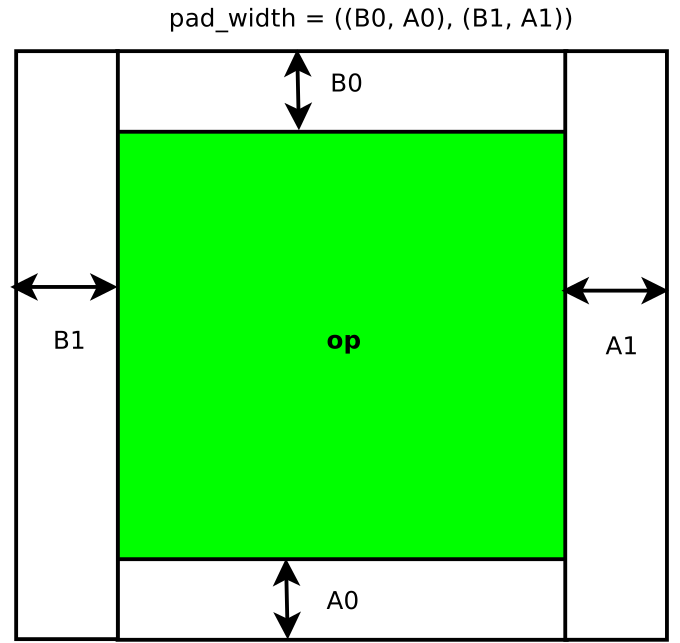
- Example:
>>> import lazylinop as lz
>>> from numpy import arange
>>> A = arange(18*2).reshape((18, 2))
>>> A
array([[ 0,  1],
       [ 2,  3],
       [ 4,  5],
       [ 6,  7],
       [ 8,  9],
       [10, 11],
       [12, 13],
       [14, 15],
       [16, 17],
       [18, 19],
       [20, 21],
       [22, 23],
       [24, 25],
       [26, 27],
       [28, 29],
       [30, 31],
       [32, 33],
       [34, 35]])
>>> lpA = lz.pad(A, (2, 3))
>>> lpA
<23x2 LazyLinOp with dtype=int64>
>>> lpA.toarray()
array([[ 0,  0],
       [ 0,  0],
       [ 0,  1],
       [ 2,  3],
       [ 4,  5],
       [ 6,  7],
       [ 8,  9],
       [10, 11],
       [12, 13],
       [14, 15],
       [16, 17],
       [18, 19],
       [20, 21],
       [22, 23],
       [24, 25],
       [26, 27],
       [28, 29],
       [30, 31],
       [32, 33],
       [34, 35],
       [ 0,  0],
       [ 0,  0],
       [ 0,  0]])
>>> lpA2 = lz.pad(A, ((2, 3), (4, 1)))
>>> lpA2
<23x7 LazyLinOp with dtype=int64>
>>> lpA2.toarray()
array([[ 0,  0,  0,  0,  0,  0,  0],
       [ 0,  0,  0,  0,  0,  0,  0],
       [ 0,  0,  0,  0,  0,  1,  0],
       [ 0,  0,  0,  0,  2,  3,  0],
       [ 0,  0,  0,  0,  4,  5,  0],
       [ 0,  0,  0,  0,  6,  7,  0],
       [ 0,  0,  0,  0,  8,  9,  0],
       [ 0,  0,  0,  0, 10, 11,  0],
       [ 0,  0,  0,  0, 12, 13,  0],
       [ 0,  0,  0,  0, 14, 15,  0],
       [ 0,  0,  0,  0, 16, 17,  0],
       [ 0,  0,  0,  0, 18, 19,  0],
       [ 0,  0,  0,  0, 20, 21,  0],
       [ 0,  0,  0,  0, 22, 23,  0],
       [ 0,  0,  0,  0, 24, 25,  0],
       [ 0,  0,  0,  0, 26, 27,  0],
       [ 0,  0,  0,  0, 28, 29,  0],
       [ 0,  0,  0,  0, 30, 31,  0],
       [ 0,  0,  0,  0, 32, 33,  0],
       [ 0,  0,  0,  0, 34, 35,  0],
       [ 0,  0,  0,  0,  0,  0,  0],
       [ 0,  0,  0,  0,  0,  0,  0],
       [ 0,  0,  0,  0,  0,  0,  0]])
>>> # the same with arbitrary values
>>> pw = ((2, 3), (4, 1))
>>> cv = ((-1, -2), (-3, (-4)))
>>> lpA3 = lz.pad(A, pw, constant_values=cv)
>>> lpA3
<23x7 LazyLinOp with dtype=int64>
>>> lpA3.toarray()
array([[-3, -3, -3, -3, -1, -1, -4],
       [-3, -3, -3, -3, -1, -1, -4],
       [-3, -3, -3, -3,  0,  1, -4],
       [-3, -3, -3, -3,  2,  3, -4],
       [-3, -3, -3, -3,  4,  5, -4],
       [-3, -3, -3, -3,  6,  7, -4],
       [-3, -3, -3, -3,  8,  9, -4],
       [-3, -3, -3, -3, 10, 11, -4],
       [-3, -3, -3, -3, 12, 13, -4],
       [-3, -3, -3, -3, 14, 15, -4],
       [-3, -3, -3, -3, 16, 17, -4],
       [-3, -3, -3, -3, 18, 19, -4],
       [-3, -3, -3, -3, 20, 21, -4],
       [-3, -3, -3, -3, 22, 23, -4],
       [-3, -3, -3, -3, 24, 25, -4],
       [-3, -3, -3, -3, 26, 27, -4],
       [-3, -3, -3, -3, 28, 29, -4],
       [-3, -3, -3, -3, 30, 31, -4],
       [-3, -3, -3, -3, 32, 33, -4],
       [-3, -3, -3, -3, 34, 35, -4],
       [-3, -3, -3, -3, -2, -2, -4],
       [-3, -3, -3, -3, -2, -2, -4],
       [-3, -3, -3, -3, -2, -2, -4]])
- zero-padded DFT example:
>>> import lazylinop as lz
>>> from lazylinop.wip.signal import fft
>>> e = lz.eye(5)
>>> pe = lz.pad(e, (0, 3))
>>> pfft = fft(8) @ pe
See also
- lazylinop.vstack(ops)
Concatenates linear operators horizontally.
- Args:
- ops: (
tupleof compatible linear operators) For any pair
i, j < len(ops),ops[i].shape[1] == ops[i].shape[1].
- ops: (
- Returns:
A concatenation
LazyLinOp.- Example:
>>> import numpy as np
>>> import lazylinop as lz
>>> from lazylinop import islazylinop
>>> A = np.ones((10, 10))
>>> B = lz.ones((2, 10))
>>> lcat = lz.vstack((A, B))
>>> islazylinop(lcat)
True
>>> np.allclose(lcat.toarray(), np.vstack((A, B.toarray())))
True
See also